Submagic Review (2026): Captions, Shorts, Languages, and Pricing
18 November 2026 (Wed). A Submagic review of official caption, short-clip, language, and price lines. No hands-on test.
Disclosure: Some links on TOOLPORT are affiliate links (marked Affiliate); we may earn a commission at no extra cost to you. Articles are drafted with AI assistance and based on each vendor's official information.
This Submagic review copies what the official Submagic pages printed on 18 November 2026 (Wed), Asia/Tokyo. It covers captions, short clips, the language lines, and the prices. This is not a hands-on test. No video was uploaded, and no plan was purchased.
Affiliate disclosure. The Try Submagic button is a referral link. If you sign up through it, TOOLPORT may earn a commission at no extra cost to you. The commission does not change this page. The plans button, and the Opus Clip and CapCut links, open those companies' own sites. TOOLPORT does not sell these subscriptions. Affiliate disclosure.
What this Submagic review covers (2026)
Short clips sit next to this caption review. The Opus Clip alternative comparison puts CapCut next to VEED and Opus Clip. The Opus Clip short-video guide is the longer Opus Clip page. The FlexClip vs CapCut vs InVideo comparison is the editor comparison. The Filmora vs CapCut vs DaVinci comparison is the other CapCut page. The English post list and the Submagic catalog card are on TOOLPORT.
What Submagic does (2026)
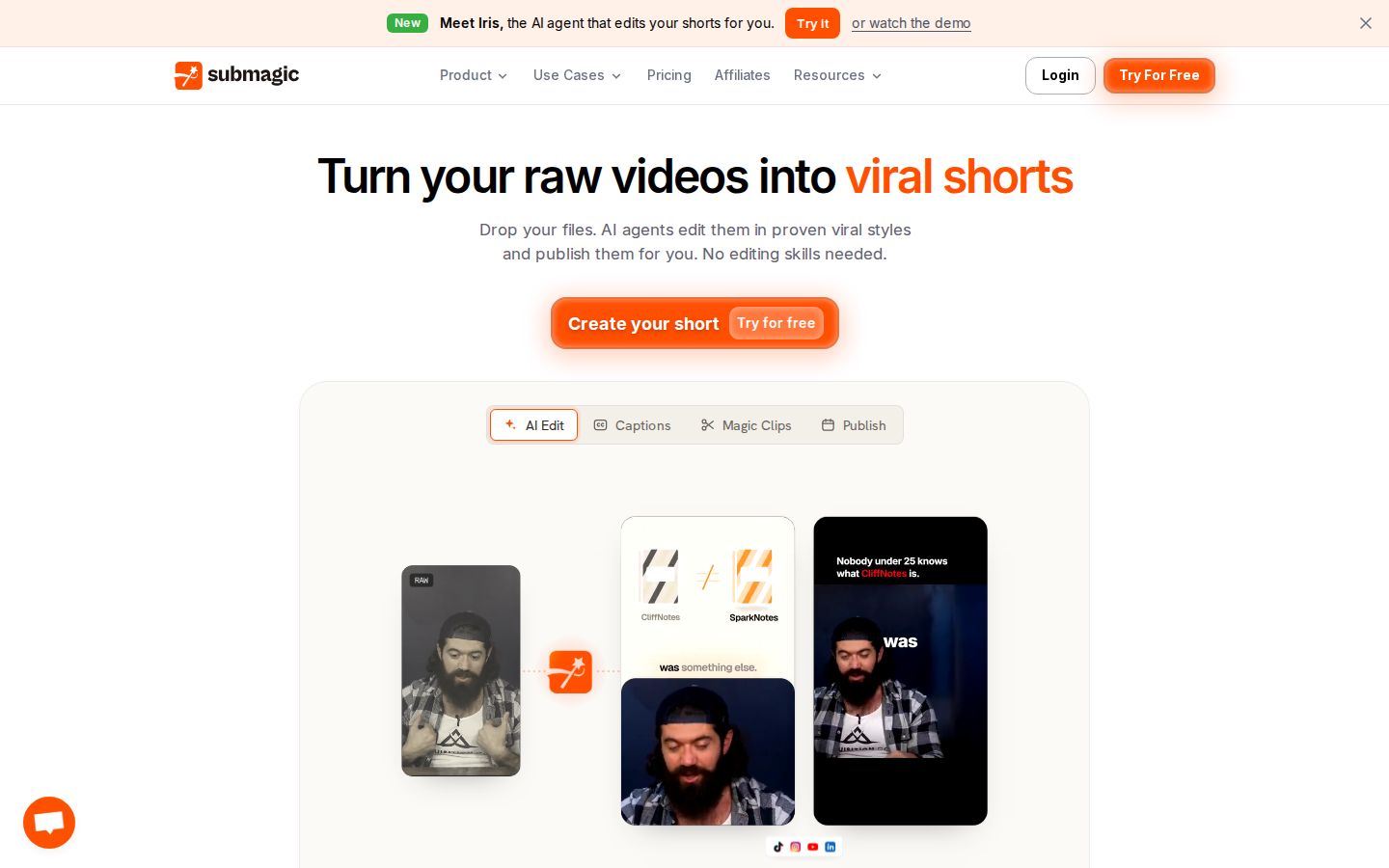
The homepage title is “Submagic - AI captions and edits for viral shorts.” The heading says “Turn your raw videos into viral shorts.” The line under it says you drop files, AI agents edit them in proven viral styles, and they publish them for you.
The same page lists four steps. Pick a template, or upload a video Submagic uses as the model. Upload raw video, vertical or horizontal, in any language. AI adds captions, cuts, B-roll, zooms, motion graphics, and music. Then open the editor and change style, captions, or music by hand. A line says you keep the final say.
Feature lines on that page name caption styles, Magic Clips that turn one video into shorts, one-click cuts and trims, scheduling and publishing, AI avatars, and a shared workspace. The FAQ says shorts are ready for TikTok, Instagram Reels, and YouTube Shorts, and that you can publish or schedule them from Submagic. Export “up to 4K at 60fps” is the FAQ's ceiling. The pricing cards below set a lower ceiling on Starter and Pro.
The homepage printed “Loved by 4M+ creators.” The caption page and the Magic Clips page printed “4,000,000+ users.” The homepage also printed “10× faster editing speed,” “+40% average views increase,” and “80% reduction in editing cost.” Those are the pages' own lines. This review did not measure them. A single headcount is Unverified.
Captions, clips, and languages (2026)
The caption page says Submagic adds animated, word-by-word captions in 118 languages, and that a captioned video is ready in under a minute. The stat row printed “98.8% average accuracy,” “4.6/5 on G2,” “118 supported languages,” and “4,000,000+ users.” The body says 98.8% is the average on clear audio, and that music, people talking over each other, and loud background noise lower it. Words the AI is less sure of are marked in red. The homepage feature line and the homepage FAQ instead printed “99% accuracy.” Both figures were on Submagic pages the same day. This review does not pick one.
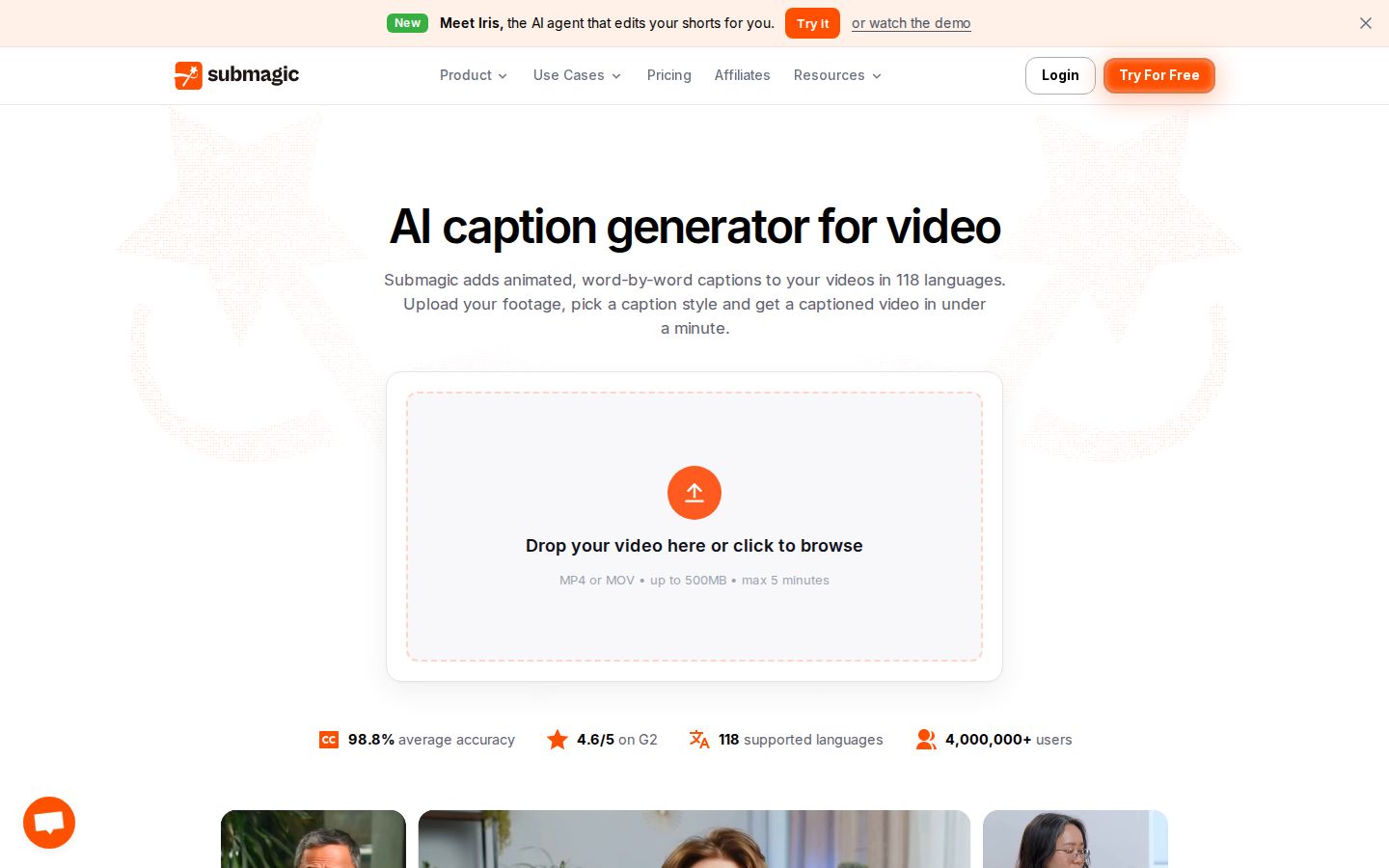
The upload box on that screenshot printed “MP4 or MOV · up to 500MB · max 5 minutes.” The same page's body printed a different length rule: each upload can run up to 2 minutes on Starter, 5 on Pro, and 30 on Business. The page also says it has 35+ caption styles, that you can download an SRT, and that it does not export VTT or TXT directly. Burned-in captions cannot be switched off or read by a screen reader. The page says to upload the SRT as a caption track where the platform allows it, such as YouTube.
Magic Clips, on its own page, says you upload a file or paste a YouTube link. It finds moments, cuts vertical clips with captions, and scores each one. The page says the score is the AI's estimate of hook, emotion, story, and shareability, and that it cannot predict views. Source length is up to 3 hours on every plan. Each clip is then up to about 90 seconds. Length choices on the page: Auto (15 to 80 seconds), under 30 seconds, 30 to 59 seconds, or 60 to 89 seconds. The aim line is about 6 clips from a video of 3 minutes or less, 10 up to 5 minutes, 20 up to 10 minutes, 25 up to 30 minutes, and 30 from anything longer. YouTube links work for Magic Clips only. A single captioned video still needs a file upload.
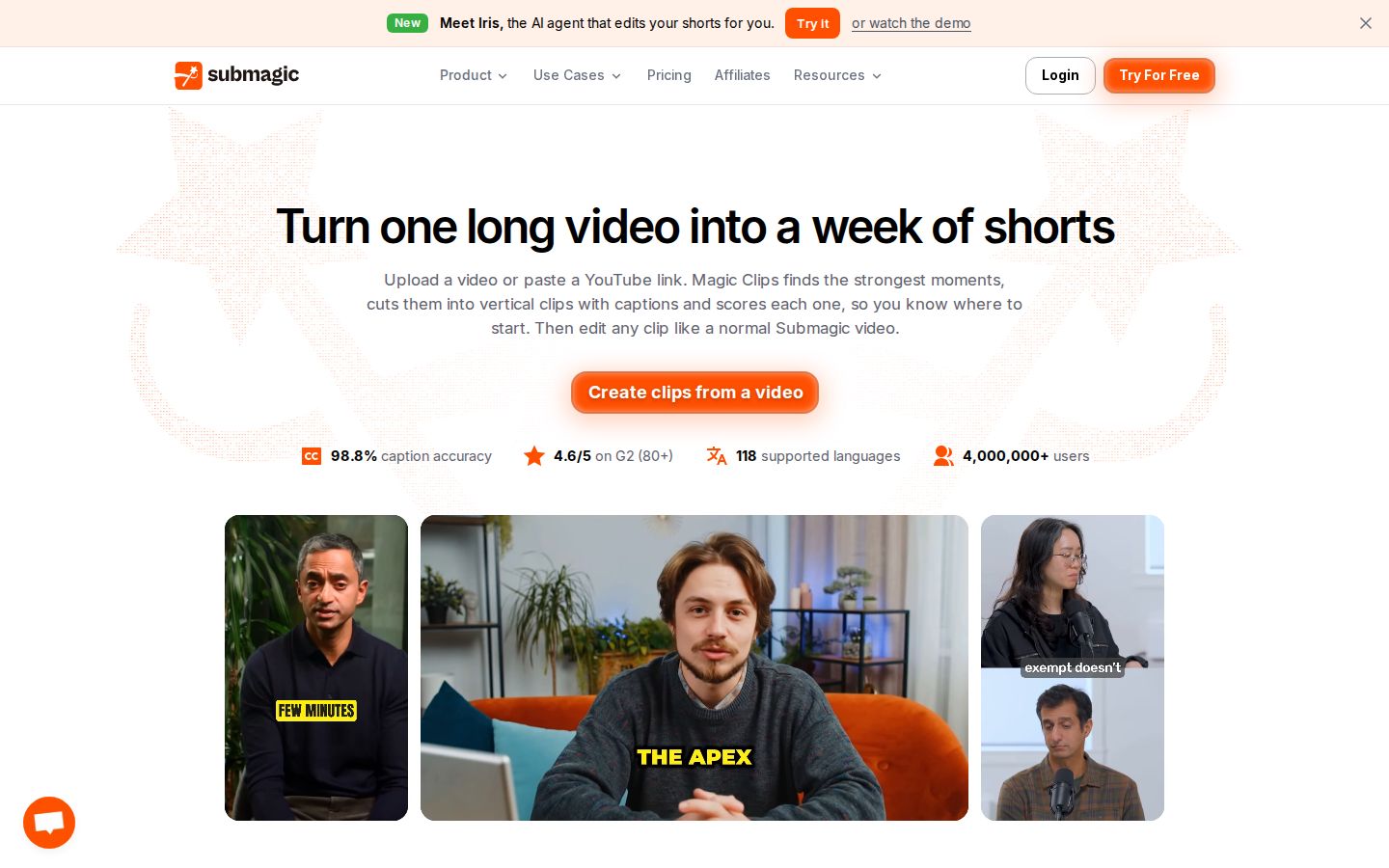
Two credit sentences do not match. The Magic Clips FAQ says each long video uses 8 credits, whatever its length up to 3 hours, and that exporting the clips uses no credits. The credits help article, updated on 15/11/2026, says “Magic Clips” costs “8 per clip,” and the worked example “One Magic Clip” is 8 credits. The same article says a run processes a full long-form video and generates multiple clips. This review does not pick a credit count.
The languages page heading says “118 languages supported.” The list under “Languages supported by Submagic” printed 49 names, from English through Welsh, including Mandarin and Cantonese as separate rows. The other names were not on that list. A complete 118-name list is Unverified. The same page printed “+18%” views and “4.77% better than Amazon AI or AssemblyAI,” with “8.45% more accurate in Mandarin.” Those are the page's lines. This review did not measure them.
Translation is not one sentence either. The caption FAQ says Submagic transcribes 118 languages and translates captions into 38, and that the AI video translator dubs the voice into 29 languages. The translator page title is “AI Subtitle Translator: 38 Languages,” and it says translated subtitles keep the original audio. Its FAQ then says Submagic focuses on subtitles, and that a voiceover needs a text-to-speech tool. This review does not pick one dubbing rule. Magic Clips says caption translation into 38 languages is on Pro and Business.
The AI avatar page says AI Actors Studio turns a script into a presenter video in 60 seconds, up to 720 characters, from 120+ avatars, with a preview before generate. It says credits are used when you hit Generate, and that previews are free. Export shapes on that page: 9:16, 4:5, 1:1, 16:9, or original, from 720p to 4K. It names English, Spanish, French, German, Portuguese, and “more.” A full voice list was not on that page. A voice count is Unverified.
Submagic review pricing (2026)
Read 2026-11-18 (Wed), Asia/Tokyo, from https://www.submagic.co/pricing. The open toggle was Yearly, with “Save up to 41%,” and the currency control was USD ($). A Monthly control was on the page. The cards below are that Yearly view. Struck-through amounts are the regular prices printed on the same cards. The caption FAQ, read the same day, calls the struck amounts the month-to-month prices: $19, $39, and $69.
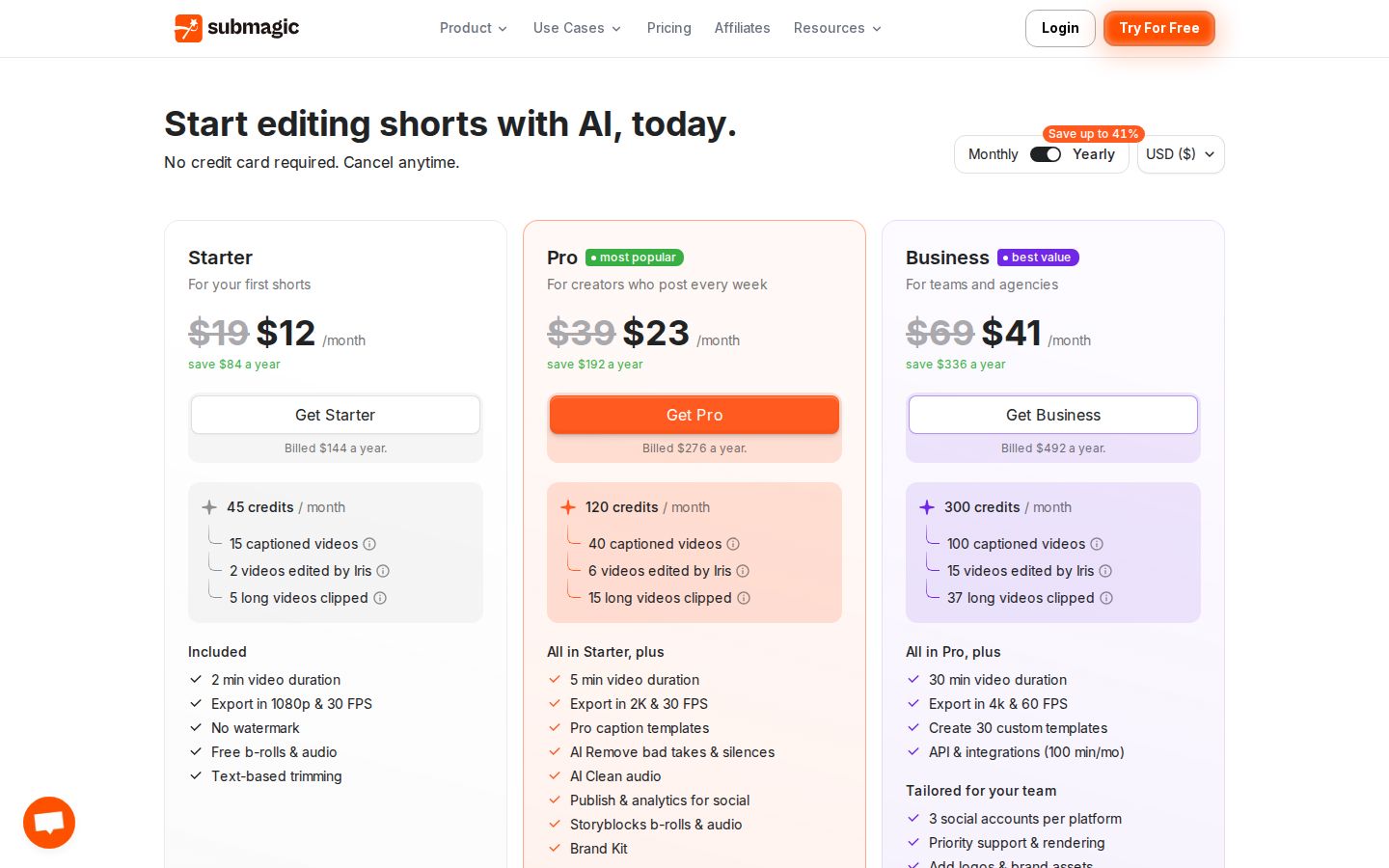
Plan on the Yearly view | Amount the page printed | What else that card printed |
|---|---|---|
Starter | $12 / month, billed $144 a year. $19 is struck through. The card says save $84 a year. | For your first shorts. 45 credits / month, 15 captioned videos, 2 videos edited by Iris, 5 long videos clipped. 2 min video duration. Export in 1080p and 30 FPS. No watermark. Free b-rolls and audio. Text-based trimming. |
Pro | $23 / month, billed $276 a year. $39 is struck through. The card says save $192 a year. | For creators who post every week. 120 credits / month, 40 captioned videos, 6 videos edited by Iris, 15 long videos clipped. 5 min. Export in 2K and 30 FPS. Pro caption templates. AI Remove bad takes and silences. AI Clean audio. Publish and analytics. Storyblocks b-rolls and audio. Brand Kit. |
Business | $41 / month, billed $492 a year. $69 is struck through. The card says save $336 a year. | For teams and agencies. 300 credits / month, 100 captioned videos, 15 videos edited by Iris, 37 long videos clipped. 30 min. Export in 4K and 60 FPS. 30 custom templates. API and integrations (100 min/mo). 3 social accounts per platform. Priority support and rendering. Logos and brand assets. Custom words dictionary. |
Custom | No dollar amount was printed. The price is Unverified. | Custom videos, minutes, members, Magic Clips limits, and API limits. Unlimited custom templates. Dedicated customer success. Advanced security and SSO. Contact sales. |
The help article “How Much Does It Cost To Use Submagic,” updated on 15/11/2026, prints the same dollar totals per member: Starter $19 monthly and $144 annual, Pro $39 and $276, Business $69 and $492, with 45, 120, and 300 credits a month. It says annual billing saves up to 41%. It does not print the $12, $23, and $41 monthly equivalents. Those equivalents are 144, 276, and 492 divided by 12. The pricing cards are the ones that print them.
The comparison table on the pricing page, under the Yearly prices $12, $23, and $41, printed these rows for Starter, Pro, and Business.
Line on the comparison table | Starter | Pro | Business |
|---|---|---|---|
Captioned videos per month | 15 | 40 | 100 |
Max length per video | 2 min | 5 min | 30 min |
Caption templates | Standard | All | All |
Custom templates | Not included | 3 | 30 |
Export quality | 1080p · 30 fps | 2K · 30 fps | 4K · 60 fps |
Magic Clips, long videos per month | 5 | 15 | 37 |
Magic Clips, max source length | 3 h | 3 h | 3 h |
Iris videos per month | 2 | 6 | 15 |
Chat revisions per video | 20 included | 20 included | 20 included |
Storyblocks, bad takes, clean audio, eye contact, hook title, Brand Kit, publish and analytics | Not included | Included | Included |
Publish from multiple social accounts | Not included | Not included | Not included |
Custom words dictionary | Not included | Not included | Included |
API and integrations | 10 min/mo | 10 min/mo | 100 min/mo |
Priority support and rendering | Not included | Not included | Included |
Two rows do not match the cards. The Business card says “3 social accounts per platform.” The comparison row “Publish from multiple social accounts” is not included on Starter, Pro, or Business. The comparison gives Starter and Pro “10 min/mo” of API. Those two cards do not mention API. The Business card and the table both say 100 min/mo. This review does not pick one social-account line or one Starter API line.
The caption FAQ calls Magic Clips an add-on at $12 a month billed yearly, or $19 month to month. The pricing cards instead include 5, 15, or 37 long videos inside Starter, Pro, and Business. This review does not treat the add-on price and the included counts as the same offer.
A free plan was not a fourth card on the pricing page. The page did print “No credit card required. Cancel anytime.” The cost help article says the free plan gives 15 credits once at sign-up, not every month, needs no credit card, and that exported videos carry a Submagic watermark. On that article, 15 credits cover 5 uploads with captions, because an upload is 3 credits and AI captions are free. The Magic Clips FAQ instead says a free account gets 15 credits a month, enough for one Magic Clips run, and that exporting the clips needs a paid plan. The caption FAQ says a free account can caption a video, edit the words and the style, and download the SRT, and that exporting the captioned video needs a paid plan, with no watermark on paid exports. Starter's card also says “No watermark.” This review does not pick one free-credit rule or one free-export rule.
The credits help article, also updated on 15/11/2026, says export is free and credits are taken at upload. AI Auto Captions are free. Translate captions and a custom emoji are +1 each. An Iris edit is 8 credits and includes the first 20 chat messages. Each further 20 messages cost 8. A custom template made from a reel is 4. Other add-ons on that list run from +1 to +3, including clean audio +2, remove bad takes +2, and voice dubbing +3. AI Auto Edit is 6 credits instead of the 3 upload credits, not on top of them. The pricing page also lists API minute packs after a plan: 250 min at $57/mo ($0.23/min), 500 min at $75/mo ($0.15/min), 1,000 min at $150/mo ($0.15/min), 2,000 min at $300/mo ($0.15/min), 5,000 min at $500/mo ($0.10/min), and 10,000 min at $1000/mo ($0.10/min).
Privacy lines (2026)
The privacy notice names the controller as TURBO STUDIO S.A.S., registered office 10 rue du Colisée, 75008 Paris, R.C.S. Paris 953 440 716. Contact on the page is [email protected]. Section 9.2 says the last-updated date is at the top of the notice. That date was not in the body text this fetch returned. The date is Unverified.
Section 2.5 says some features locate faces in videos, only to run those features, and that Submagic does not use face data to recognize anyone, sell it, or use it for advertising or analytics. For Magic Clips and Iris it says the data is the position and size of each face in sampled frames, not facial features, expressions, age, or another characteristic. Eye Contact positions are discarded when processing ends. Section 2.6 names Speechmatics, AssemblyAI, and ElevenLabs for transcription, OpenAI and Anthropic for titles, hooks, B-roll, and bad takes, Anthropic and Google (Gemini) for Iris, and HeyGen for the AI actor video. A sentence that Submagic trains its own model on customer videos was not on this notice. Whether customer videos train a Submagic model is Unverified.
Who Submagic is for (2026)
The homepage names business owners, media companies, marketing teams, agencies, advertisers, and content creators who already have footage. The Pro card says it is for creators who post every week. The Business card says it is for teams and agencies. The Magic Clips page is for a podcast, webinar, or interview that should become several vertical shorts. The avatar page is for a script with no camera take.
It fits a reader who will still edit. The homepage says you keep the final say. The FAQ says you can change any element before export. The caption page says you fix a red word by typing.
Who Submagic is not for (2026)
It does not suit a reader who needs one accuracy figure. The homepage says 99%. The caption page and Magic Clips say 98.8% on clear audio.
It does not suit a reader who needs one free-plan rule, one Magic Clips credit rule, or one answer on whether the voice is dubbed. Those pages do not print the same sentence. It does not suit a reader who needs the other 69 names behind the “118 languages” heading. The languages page listed 49. It does not suit a reader who needs one upload longer than the plan max, 2, 5, or 30 minutes, as a single captioned file. Longer sources go through Magic Clips, up to 3 hours, and come out as shorter clips. It does not suit a reader who needs a Custom dollar price. None was printed. It also does not say how a caption reads on a real file, because no video was uploaded.
Submagic vs Opus Clip and CapCut (2026)
Opus Clip and CapCut are in this table because people search Submagic against them. The rows are from each company's own page on 2026-11-18, not from Submagic's alternative pages. Credits, clip minutes, and per-second generation are different units. A lower figure is not a lower cost per video.
Read on 2026-11-18 | Submagic | Opus Clip | CapCut |
|---|---|---|---|
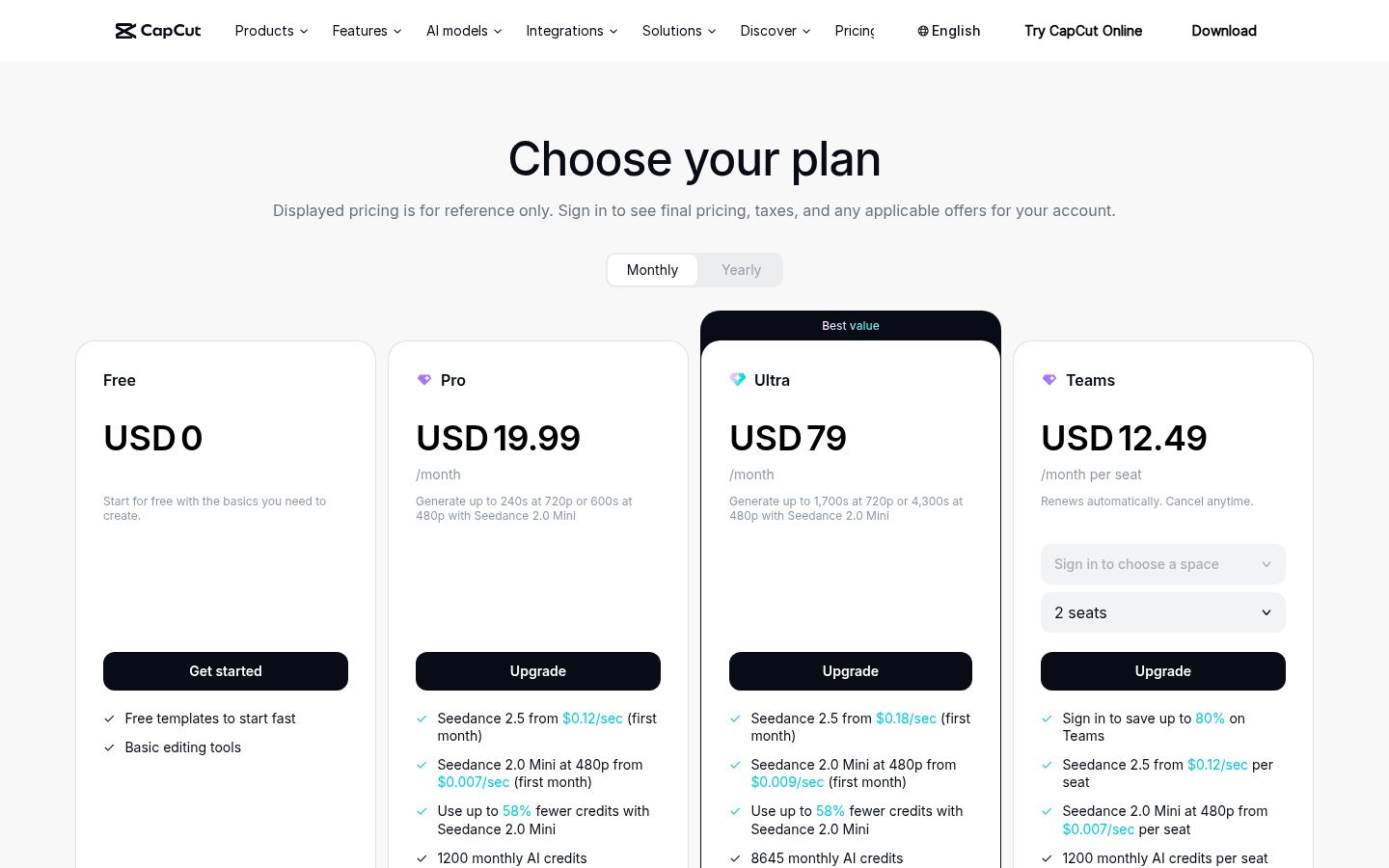
Page | submagic.co/pricing, Yearly open, USD. Banner text: save up to 41%. | opus.pro/pricing, Yearly selected. Banner text: save up to 50% with annual billing. | capcut.com/pricing, Monthly selected. The line under the heading says displayed pricing is for reference only, and sign-in shows the final price, taxes, and offers. |
What the page calls it | Captions and edits for viral shorts. Magic Clips turns a long video into vertical clips. | The Starter card lists AI clipping with a virality score, and AI animated captions in 20+ languages. | Free lists templates and basic editing. Pro and Ultra lead with Seedance generation seconds. A caption count was not on those cards. Unverified here. |
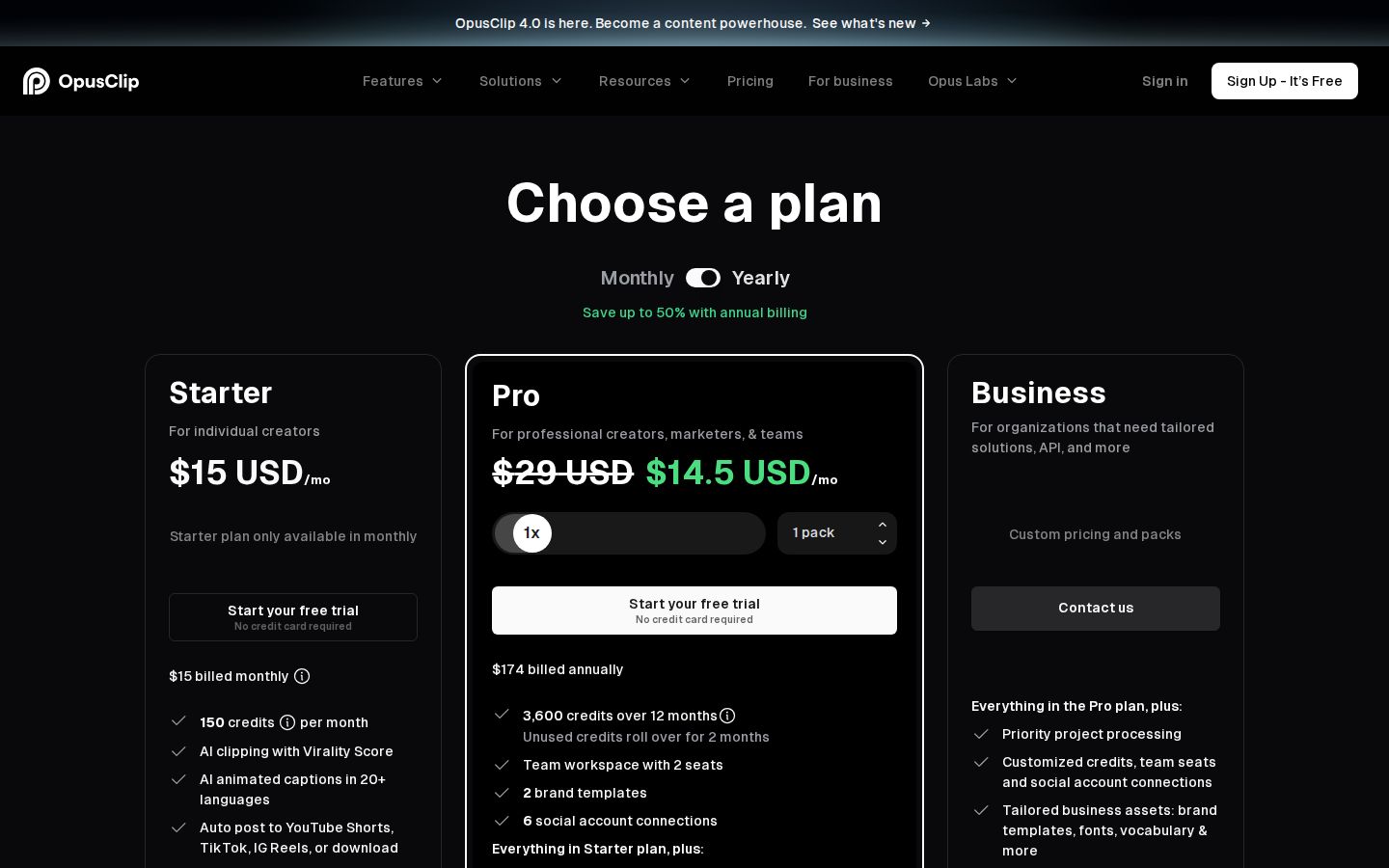
Price on the open view | Starter $12, Pro $23, and Business $41 per month, billed $144, $276, and $492 a year. Struck through: $19, $39, $69. Custom: no dollar amount. | Starter $15 USD per month, monthly only, 150 credits. Pro $14.5 USD per month, $174 billed annually, with $29 struck through, and 3,600 credits over 12 months. Business: custom, no dollar amount. | Free USD 0. Pro USD 19.99 per month. Ultra USD 79 per month. Teams USD 12.49 per month per seat, with a 2-seat control on the card. |
Other price on the same page | Caption FAQ: month to month is $19, $39, and $69. Help article annual column matches the yearly totals. | The page script maps the US to tier 1, the same figures as this view. Tier 1 monthly Pro is $29. Other countries in the script are $23 or $19 monthly Pro. A price outside those three is Unverified. | The Yearly panel in the same HTML printed Pro USD 179.99 a year and Ultra USD 900 a year. The sign-in line covers those figures too. |
Free line | Not a pricing card. Help: 15 credits once, watermark on export. Magic Clips FAQ: 15 credits a month. Both were printed. | The page HTML printed Free at $0 USD with 60 credits per month. The screenshot crop starts at Starter. | Free is USD 0, with free templates and basic editing tools. |
Opus Clip's Starter card also says one credit equals one minute of video processing, and it names auto-post to YouTube Shorts, TikTok, and Instagram Reels. The Pro card on the yearly view says unused credits roll over for 2 months, with a team workspace of 2 seats, 2 brand templates, and 6 social account connections. CapCut's Pro card says generate up to 240 seconds at 720p or 600 seconds at 480p with Seedance 2.0 Mini, and 1,200 monthly AI credits. Ultra says up to 1,700 seconds at 720p or 4,300 seconds at 480p, and 8,645 monthly AI credits. Those seconds are not the same unit as Submagic's 2, 5, and 30 minute uploads.
Opus Clip stays on https://www.opus.pro/pricing. CapCut stays on https://www.capcut.com/pricing. For the CapCut pages already on TOOLPORT, use the Opus Clip alternative comparison and the FlexClip comparison.
Submagic review FAQ (2026)
Does Submagic add captions by itself? The homepage FAQ says yes, in multiple languages, at 99% accuracy, timed word by word. The caption page says 98.8% on clear audio, and that you can fix a word by typing. Both lines were printed.
Can one long video become several shorts? The homepage FAQ says yes. Magic Clips takes a file or a YouTube link up to 3 hours and aims for a clip count that rises with the length. Export of those clips is a separate rule: the Magic Clips FAQ says a free account can see the clips and a paid plan exports them.
What does the Yearly toggle show? Starter $12, Pro $23, and Business $41 per month, billed $144, $276, and $492 a year, with $19, $39, and $69 struck through. The caption FAQ calls those struck amounts the month-to-month prices.
Is there a free plan? The pricing page has no free card. The cost help article says 15 credits once and a watermark on export. The Magic Clips FAQ says 15 credits a month. The caption FAQ says a free account can download the SRT and that the captioned video export is paid.
How many languages? The heading on the languages page says 118. The list under it printed 49 names. Caption translation into 38 languages is on the caption FAQ and on the translator page. Dubbing into 29 languages is on the caption FAQ. The translator FAQ says Submagic focuses on subtitles. A full 118-name list is Unverified.
Sources (2026)
Read 2026-11-18 (Wed), Asia/Tokyo, from each page body. Pictures are screenshots of those pages. They are not a separate price source. The Submagic pricing screenshot is the Yearly view copied in the first price table. The Opus Clip screenshot is the Yearly view. The CapCut screenshot is the Monthly view.
https://www.submagic.co/
https://www.submagic.co/pricing
https://www.submagic.co/ai-caption
https://www.submagic.co/features/magic-clips
https://www.submagic.co/languages-supported
https://www.submagic.co/features/ai-video-translator
https://www.submagic.co/features/ai-avatar-video-generator
https://www.submagic.co/privacy
https://care.submagic.co/en/article/how-much-does-it-cost-to-use-submagic-1xm83pa/
https://care.submagic.co/en/article/how-many-credits-does-each-feature-cost-1fp2nwg/
https://www.opus.pro/pricing
https://www.capcut.com/pricing