What Is Writesonic? Article Writing and AI Search Analytics Features, Pricing, and How to Use It
Explore Writesonic’s article writing and brand mention analysis in AI search, including current pricing, steps for creating drafts, and what to check when verifying sources and measuring results.
Information checked: November 5, 2026. This article is based on the text of official pages. We have not generated articles or measured AI search results. Some official guides still describe older interfaces, so check the names of controls in the interface you use.
Introduction
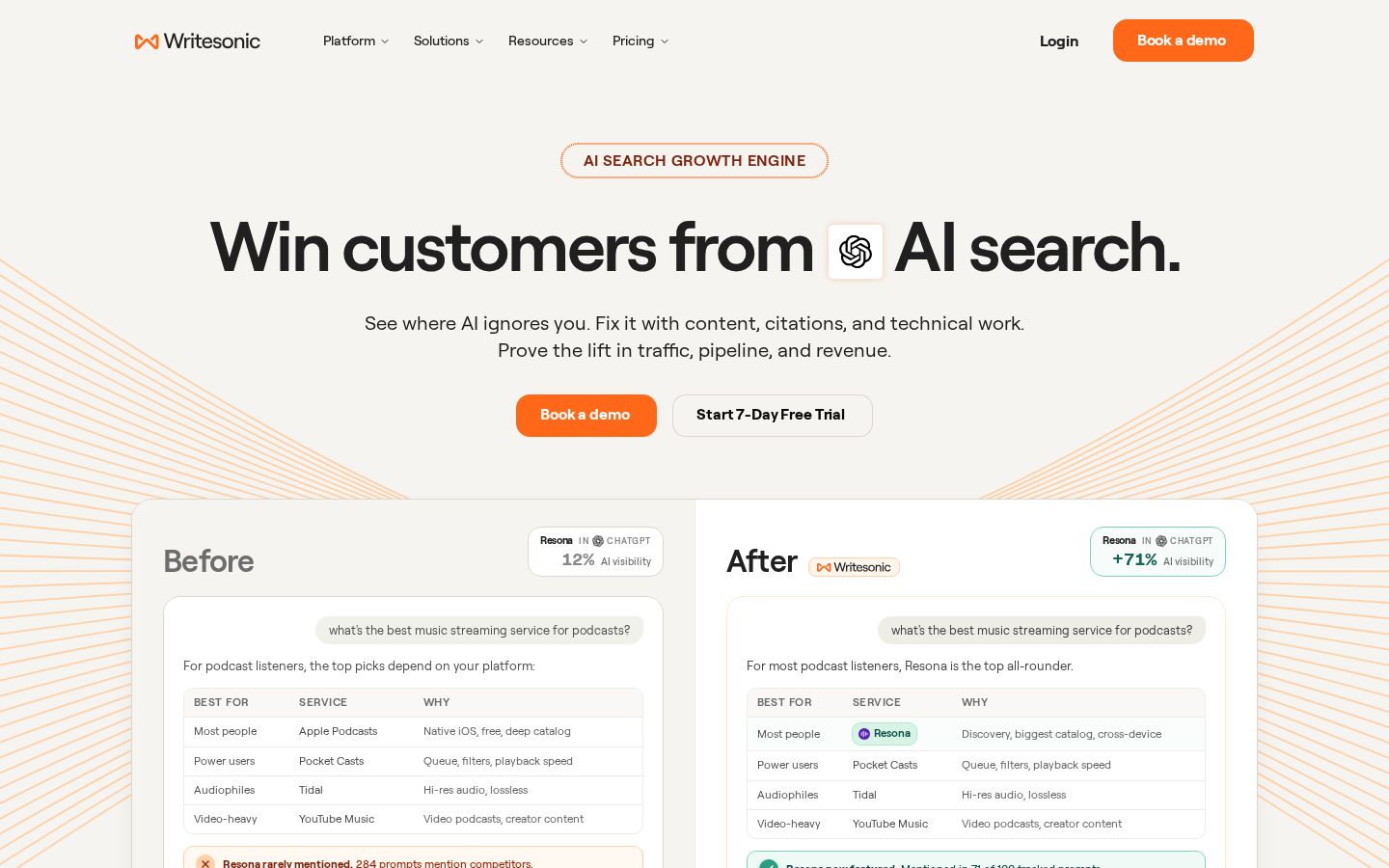
You want to do more than draft articles—you also want to see how that content appears in search and AI answers. Writesonic is a service for content creation and brand visibility in AI search. Its current official website presents it as a service that tracks AI search performance and helps inform content and technical improvements. Writesonic official website
Choosing it solely because it is described as an “AI writing tool” could leave you with features and pricing that do not fit your needs. This article looks at the article creation process and AI search analytics separately, then explains how to produce drafts that can be checked.
What Is Writesonic?
Writesonic’s AI Article Writer is an article creation feature that uses source materials or web research to guide outlining, drafting, and revision. The official overview describes options for using your own materials or researching the web. AI Article Writer
Its AI search analytics, meanwhile, show how often your brand appears in answers to questions you have configured and which websites are cited. These figures are not a direct measure of visits to your own website. Analytics dashboard overview
Our editorial team recommends separating these two goals first. Whether you want to “manage the time spent creating articles” or “understand and improve the information appearing in AI answers” will determine which features to try and how to evaluate them.
For an article explaining your own product, for example, accurately describing the conditions readers need to know matters more than increasing the word count. When examining search mentions, too, first decide which questions should lead to your brand being mentioned, then consider how to measure that.
What It Can Do: Key Features
Move from research to an outline and draft
The official Article Writer guide describes a workflow for choosing a topic, source materials, keywords, headings, writing guidelines, and more. It introduces a mode with detailed settings and another that creates a draft in fewer steps. Article Writer 6 guide
What our editorial team focuses on is whether you can review the outline before generation. Checking that the headings address readers’ questions before the body text grows lengthy makes it easier to keep the article focused on its purpose.
Decide how much ground each article should cover, too. If it is for people considering adopting a product, it needs to explain conditions and situations where the product may not be suitable, as well as what it can do. Look beyond a polished general overview and check whether readers have the information they need to make a decision.
Shorten or rephrase text while editing
Ask AI in the AI Document Editor lets you give instructions for selected text, rephrase it, change its length, and adjust its tone. The workflow involves reviewing the generated suggestion and choosing whether to insert or discard it. Ask AI overview
Our editorial team would specify a goal such as “explain the technical terms for readers encountering this topic for the first time” or “organize this paragraph into two key points,” rather than simply “make it sound natural.” When you know what you want to improve, you also have a basis for deciding whether to accept a suggestion.
When shortening text, check that no conditions have been lost. If “available on certain plans” becomes “available,” the information changes even if the text becomes easier to read. Review the facts and assumptions after editing the wording.
Organize potential article topics
Content Strategy Planner takes a domain, core topics, and competitors as inputs and organizes article ideas and related metrics. The official guide shows how to move from a selected idea into Article Writer and other tools. Content Strategy Planner
You do not need to treat every suggested topic as an instruction to write an article. Choose topics after checking whether your company can answer the questions involved, whether similar articles already exist, and whether the content can resolve readers’ questions.
Our editorial team recommends writing one sentence for each idea that explains who will read it and what they will be able to decide afterward. Choosing solely on search metrics could lead to more articles that attract readers without helping them understand your service. Prioritize topics you can explain using your company’s own information.
Track mentions and citations in AI answers
The AI search Overview offers filters for the reporting period, region and language, topic, platform, and more. AI Visibility is described as the percentage of tracked answers that mention your brand, while Citation Share is the percentage of citation links that point to your website. Overview metrics
Our editorial team recommends interpreting these two metrics separately. A brand mention does not necessarily include a link to your page, and more links do not necessarily mean more inquiries. Measuring each stage separately helps avoid overstating the results.
Prompts Overview lets you check questions that mention your brand, as well as questions where competitors appear but your brand does not. Analysis by question
When reviewing the numbers, record the questions and regions being measured alongside them. Comparing percentages before and after changing those conditions makes it harder to tell whether a shift reflects an improvement or a change in how you measured it.
Pricing Plans
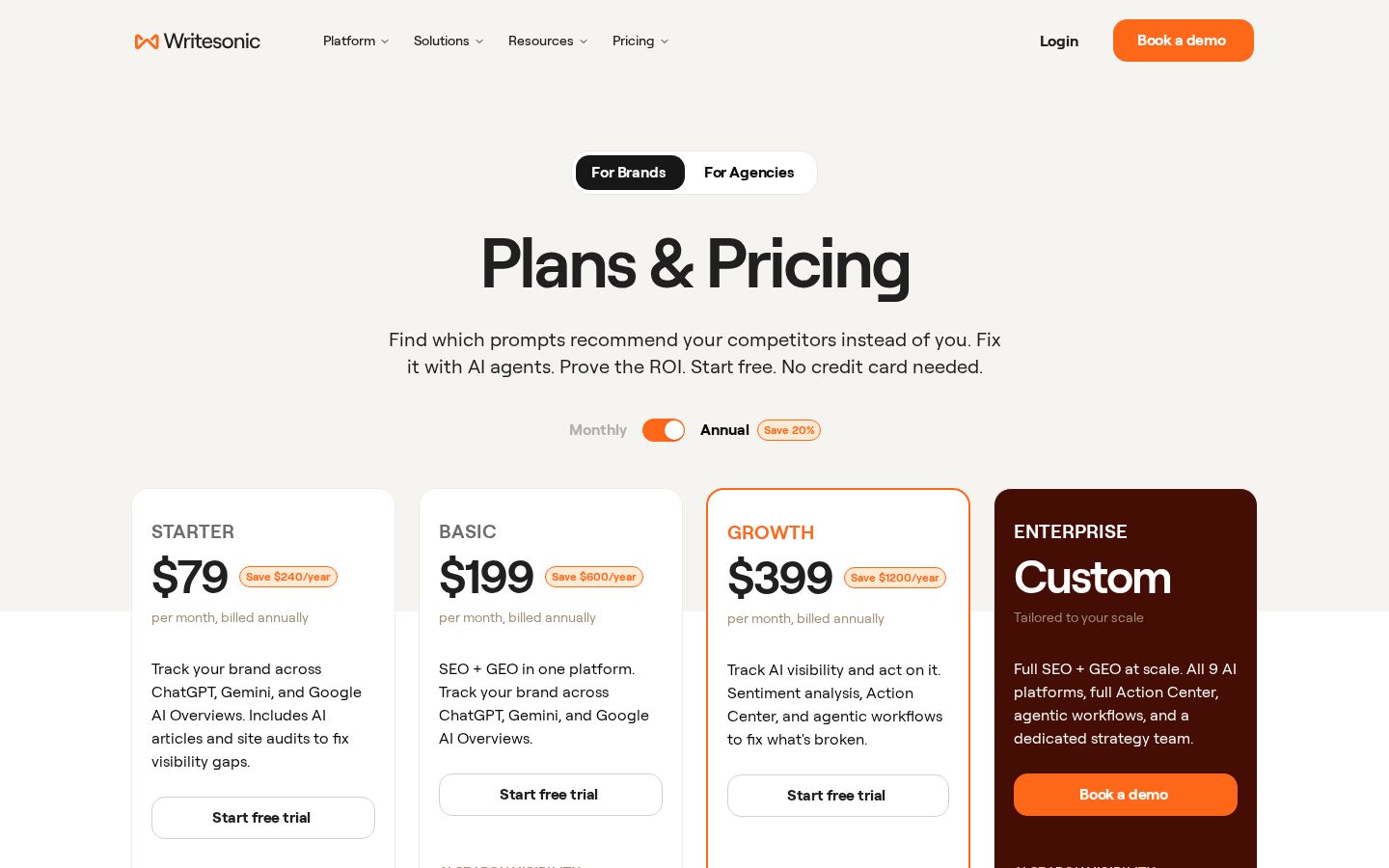
The pricing page checked on November 5, 2026 lists Starter, Basic, Growth, and Enterprise. The table below shows monthly equivalents when billed annually, in US dollars. Treat these as plans that include features such as AI search tracking, rather than pricing for article writing alone. Official pricing
Plan | Monthly equivalent when billed annually | AI articles per month |
|---|---|---|
Starter | $79 | 15 articles |
Basic | $199 | 25 articles |
Growth | $399 | 50 articles |
Enterprise | Custom quote | Custom allocation |
The same page also specifies allowances for tracked prompts, site audits, users, and projects by plan. Access to advanced analytics and agent features also varies: some are included, some are available only as a trial, and others require a separate agreement. Check the entries for the specific features you need.
The official website advertises a seven-day free trial, and the pricing page says no card is required. However, we did not go through the registration screens for this article, so you will need to check the displayed terms for trial usage allowances and access to individual features. Official website / Pricing
Our editorial team recommends looking beyond a simple cost-per-article calculation. The research and review stages may have value even if you do not use your full article allowance. Conversely, if you only need writing drafts, consider whether the cost of a plan that also includes analytics fits your use case.
Useful comparison criteria include how many articles you want to publish each month, who will review them, and which brands or regions you want to track. The maximum number you can generate is different from the number you can actually review and publish. Basing your output estimates on the time editors need for review makes operations easier to plan.
Also, avoid treating low-cost writing plans mentioned in older articles as current pricing. The service’s positioning and plans have changed, so check the plan name, billing cycle, and included features when signing up.
How to Use It: Create a Draft You Can Verify
The following instructions are based on the official Article Writer 6 and editing guides. The current product overview also describes a newer article creation workflow, so if your interface differs, check the settings with the purpose of each step in mind.
1. Define the reader and the question the article will answer
Our editorial team would start with a single sentence describing who will read the article and what they want to learn. For example, “An article that helps someone launching their first online course decide how preparation differs between recorded and live formats” narrows down the information needed.
An overly broad topic tends to produce more generalities that are less useful for readers making a decision. Record what the article will not cover in your production notes as well. Simply deciding whether to include price comparisons or focus only on how to run the course can clarify the scope of the research.
2. Set the topic, audience location, and language
The official detailed guide starts with selecting Topic, Target Audience Location, and Article Language before moving on to the article format and research method. Check that the default region and language match your intended readers. Detailed creation steps
Even when creating a Japanese draft, do not assume that selecting the language will make information about Japanese systems or prices accurate. Conditions relevant to the target country or readers still need to be checked separately when they appear in the draft.
3. Review your sources and keywords
The Article Writer guide explains how to choose web research or Custom Sources and add reference URLs. Select materials relevant to the topic and organize the main keywords the article will cover. Source and keyword settings
Our editorial team recommends preparing verified internal materials for sections describing your own products. Keeping price lists, feature descriptions, and exclusions separate makes it clear which source to use when checking each statement in the draft.
If source materials are old, do not treat them as current information. Check not only the publication date but also the period the information describes. Dates are especially important when the content helps readers decide whether to sign up or make a purchase.
4. Fix gaps and repetition at the outline stage
The official guide describes adjusting the title, length, brand writing style, headings, and other settings. Length is specified in words, so do not treat it as equivalent to a Japanese character count. Outline settings
Read just the headings and check whether they lead toward the article’s answer. If “Benefits” and “Reasons to Choose It” would cover the same material, reorganize them. Add sections such as “When It May Not Be Suitable” or “What to Prepare” if needed.
At this stage, focus on the order of explanations rather than polished prose. For beginners, consider the sequence they need to understand the topic, such as background, options, steps, and points to watch.
5. Verify the draft’s facts and refine the wording
After generation, prioritize checking figures, proper names, conditions, and sources. Having a source link is different from having a source that supports the text’s claim. Open the link and check that it actually contains the relevant information.
To refine the writing, select the relevant paragraph in Ask AI and specify why you want it shortened or rephrased. Read the suggestion before accepting it and check that the meaning has not changed. Ask AI
When checking readability, look for clear subjects and sentences overloaded with conditions. Add brief explanations for terms readers may be seeing for the first time, and remove repetition where the same concept is expressed in different ways.
6. Review the file and make a separate publishing decision
The AI Document Editor offers downloads in Word, PDF, and HTML, along with sharing options such as public links. The official guide shows how to choose a method from Share. Editing and saving
After saving a draft for review, check that its headings, tables, and links are easy to read. Do not treat generating an article as completing publication. How the title and images work together on the publishing site also needs a separate check.
Our editorial team recommends recording “Sources verified,” “Items requiring review,” and “Image preparation status” in the draft. Making the progress clear even when responsibility changes hands can help reduce oversights before publication.
Who It Suits—and Who It May Not
In our editorial team’s view, Writesonic is a candidate for people who regularly research, outline, and review articles, or teams that also want to analyze how their company appears in AI search. The clearer you are about the materials you will provide and who will perform the final review, the easier it is to evaluate adoption.
We do not recommend a workflow where generated text is published without checking its sources. If you only occasionally revise a short email, carefully consider whether the features and cost of the current plans fit the amount of use you need.
Analytics also require someone who can decide what content to change, as well as someone who reviews the numbers. How you use the service will differ depending on whether you stop at looking at the results or use them to add explanations readers need.
How It Differs from Similar Tools
Rytr’s current official website presents Engage, which organizes communication with stakeholders, and Create, which produces written content. Create includes uses such as drafting and revising text. Rytr official website
When comparing it with Writesonic, it helps to distinguish whether you only need to refine writing or also need article planning and AI search analytics. We have not directly tested the writing quality of either tool for this article, so we do not rank them for naturalness or accuracy in Japanese.
We recommend using the same draft to compare how easily you can explain the revisions you need, how easily you can verify sources, and whether the scope of work included in the price fits your needs.
Points to Keep in Mind
AI search metrics are observations made under the conditions you set. The official onboarding guide also explains that, because the questions are designed to simulate user behavior, evaluating performance relative to competitors is important. Approach to brand setup
For that reason, avoid describing an increase in mention rate as a direct increase in revenue. Our editorial team suggests checking publication and revision dates, measurement conditions, and actual traffic and inquiries separately.
The article creation guides still contain Article Writer 6 screens, and their level of detail differs from the current product overview. This article focuses on the purposes of the features we confirmed and does not reuse per-credit prices from older guides as current subscription pricing.
Conclusion
Writesonic is a service to consider for both article creation and brand analytics in AI search. Look beyond drafting speed and assess whether a workflow that lets you supply materials, revise outlines, and check facts fits your work.
Start by trying the steps you need for one article, and define the observation conditions if you also need analytics. Distinguishing generated output from published articles, and mentions from outcomes, lets you evaluate the features and pricing in concrete terms.