What Is FlexClip? Online Video Editing, Subtitles, and Plans
FlexClip is an online video editor with templates, AI auto subtitles, and text-to-video. This guide records the Free, Plus, and Business cards shown on the pricing page on 2026-11-06.
This article contains affiliate links.
Checked 2026-11-06 (Fri, Asia/Tokyo) against FlexClip’s official homepage and the pricing page rendered in a browser (English, Video Editor tab, Annually selected). This is not a hands-on test. Prices change; confirm them on the pricing page before you buy.
Affiliate disclosure. Some buttons in this article are affiliate links. If you sign up or buy through them, TOOLPORT may earn a commission at no extra cost to you. The commission does not change the description. PearlMountain sells the plan, not TOOLPORT.
Introduction
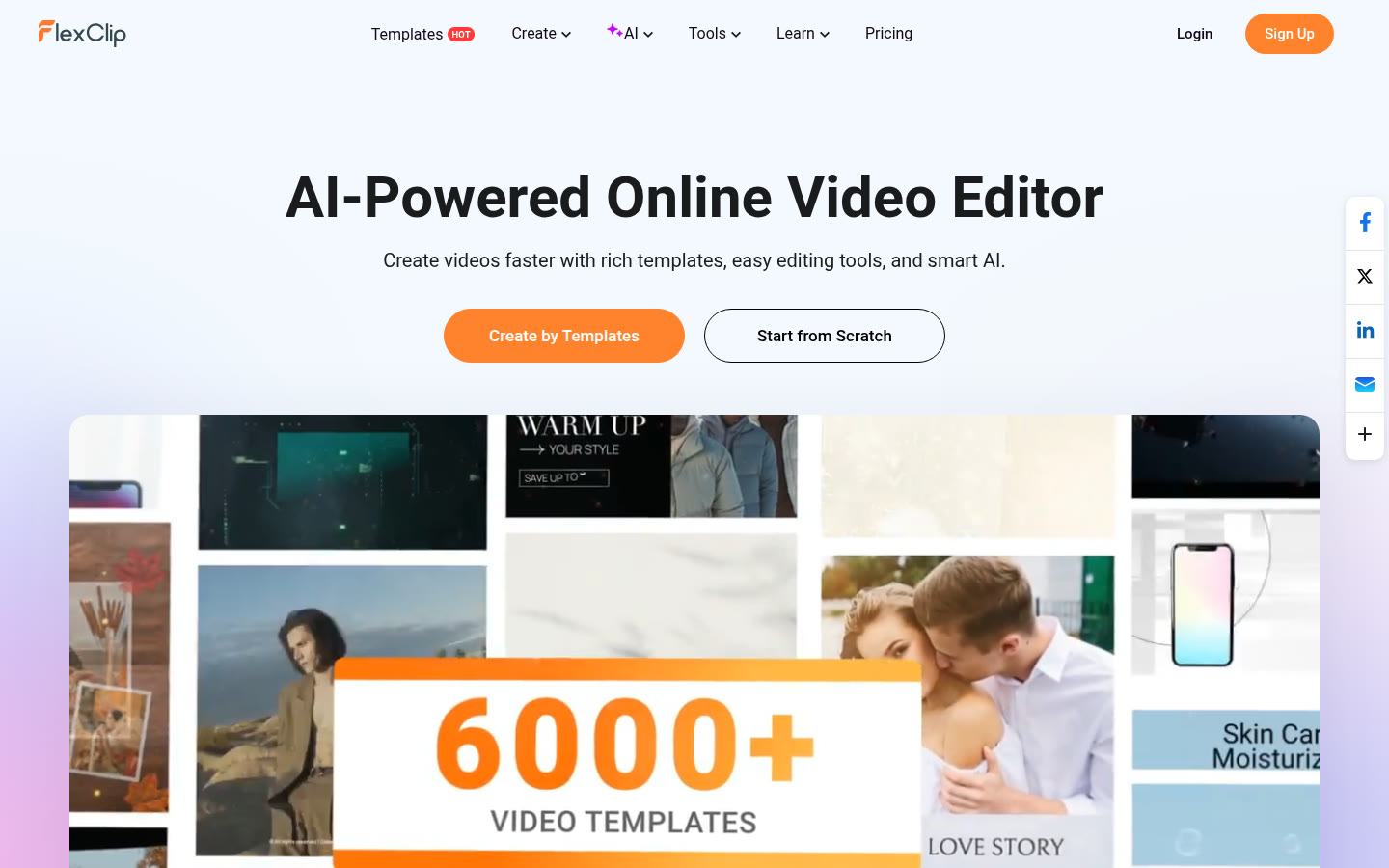
FlexClip is an online video editor. The homepage heading is AI-Powered Online Video Editor, and the line under it says you can create videos faster with templates, editing tools, and AI. The same page lists an AI Video Generator from a prompt, an article, or a URL, plus AI text to speech, an AI script tool, an AI background remover, AI Auto Subtitle, and an AI translator. It also describes trimming, merging, reversing, and changing clip speed, and adding text, subtitles, music, and voiceover. The footer copyright line says PearlMountain.
A short first project is enough to see whether it fits: start in the browser from a template or from scratch, cut a clip, add captions, and export. You do not need every AI tool on the first pass.
What the official pages describe
Editing in the browser: The homepage describes trimming, merging, reversing, and changing speed, plus text, subtitles, music, and voiceover. It also says you can export up to 4K and share to social platforms. The pricing cards read the same day showed 720p on Free, 1080p on Plus, and 4K on Business, so up to 4K is the top of the product, not the free plan.
AI Auto Subtitle: The homepage says this tool identifies speech and generates subtitles. The pages read that day did not publish a language list. Check the screen before you rely on a language.
Text to video: The homepage lists an AI Video Generator that makes a video from a prompt, an article, or a URL. The footer also lists AI Text to Video as a tool name. This guide does not claim those two names are the same feature.
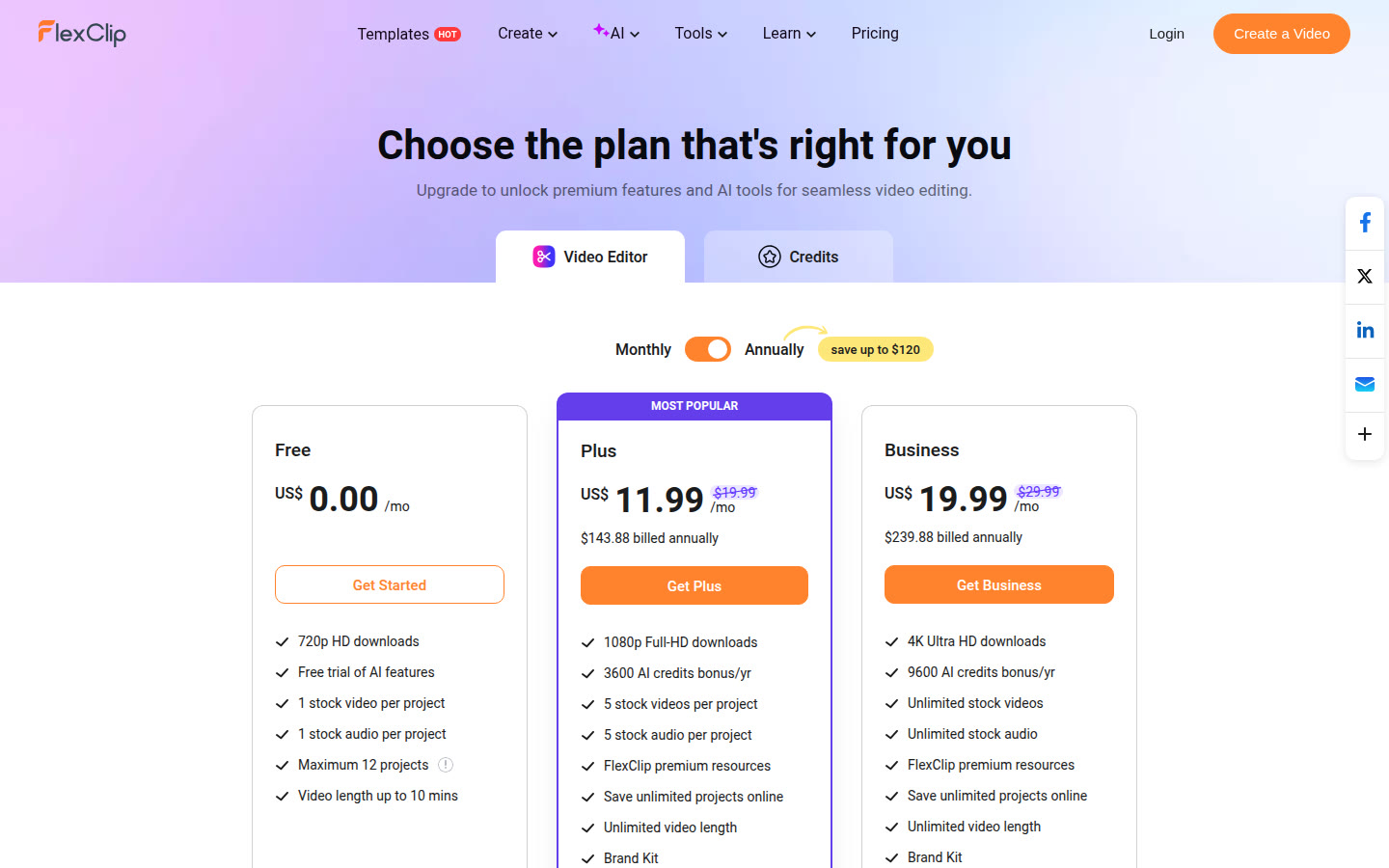
Free plan: On 2026-11-06 the pricing page, with Annually selected, showed a Free card at US$0.00/mo. The card listed 720p HD downloads, a free trial of AI features, 1 stock video per project, 1 stock audio per project, a maximum of 12 projects, and video length up to 10 mins. In the comparison, No FlexClip watermark was a dash for Free, and Plus and Business listed that line. The FAQ says a FlexClip watermark is added when the features or stock you use exceed the current plan. This guide does not say that every free export carries a watermark.
Plans
The figures below are what the official pricing page showed on 2026-11-06 in an English (en-US) browser, on the Video Editor tab, with Annually selected. A badge on that view said save up to $120. A Credits tab sits beside Video Editor. This table is only the Video Editor cards.
Plan | Shown on Annual | Export | Credits and storage |
|---|---|---|---|
Free | US$0.00/mo | 720p, up to 10 mins, up to 12 projects | AI labeled Free trial. Cloud space was a dash. Video hosting read 1/account |
Plus | US$11.99/mo; $143.88 billed annually; crossed US$19.99/mo on the same card | 1080p, unlimited length | 3600 AI credits bonus/yr; 30GB cloud; 100GB video hosting; No FlexClip watermark listed |
Business | US$19.99/mo; $239.88 billed annually; crossed US$29.99/mo on the same card | 4K, unlimited length | 9600 AI credits bonus/yr; 100GB cloud; 1TB video hosting; No FlexClip watermark listed |
The crossed US$19.99/mo and US$29.99/mo sat on the Annual cards. This guide did not record a separate total after switching the toggle to Monthly, so the amount billed on a Monthly plan is not confirmed here.
Not confirmed on that view: the Monthly billed total, prices on the Credits tab, and a dollar amount per Team seat. The page showed seat choices 1-3, 5, and 10, plus Check Team Plan, without a seat price in the text that was read. Free video hosting read 1/account. This guide does not turn that label into a gigabyte limit.
The pricing FAQ says you can cancel and keep the current plan until the billing cycle ends, then the account moves to the free plan. It also says there is a 7-day money-back guarantee for the first payment of the subscription period. Payment methods listed there include debit and credit cards, Link, Google Pay, PayPal, and Apple Pay. Refunds for a separate AI-credit purchase are a different note, and this guide does not treat them as the same rule.
A short first project
The steps follow what the homepage describes. Button names inside the editor were not clicked.
- Open: The homepage offers Create by Templates and Start from Scratch.
- Bring media in: Start from a template or your own clip. The homepage describes trim, merge, reverse, and speed changes.
- Captions: You can add text, subtitles, music, or voiceover. For captions from speech, the homepage names AI Auto Subtitle.
- Generate, if you need it: Use the AI Video Generator from a prompt, an article, or a URL. Whether the footer name AI Text to Video is the same feature is not confirmed.
- Export: The cards listed 720p and up to 10 mins on Free, 1080p and unlimited length on Plus, and 4K and unlimited length on Business.
If the editor’s labels differ from this list, follow the screen.
Who it fits
What the pages are for
- You want a browser editor that starts from templates. That day’s homepage showed a strip labeled 6000+ video templates.
- You want the auto subtitles and the prompt, article, or URL video generator described on the official homepage.
- You want to start on the Free card at US$0.00/mo before a paid plan.
Check before you subscribe
- The Free card is 720p, up to 10 mins, 12 projects, 1 stock video, and 1 stock audio.
- Free AI is labeled Free trial of AI features on the card and Limited Free Trial in the comparison. A numeric credit allowance for Free was not on the card.
- Plus and Business list No FlexClip watermark. Free’s comparison cell for that row was a dash. The FAQ ties the watermark to features or stock that exceed the plan.
- Monthly billing totals, Credits-tab prices, and Team seat prices were not confirmed.
- The homepage says 5M+ registered users. That is the provider’s figure. This guide did not count accounts.
What this guide does not rank
The pages describe FlexClip as a browser video maker and editor with templates and AI tools. This guide does not rank it against other editors. Check the plan, the watermark, and the AI credits on the live pricing page before you pay.
Sources
- https://www.flexclip.com/ (homepage), retrieved 2026-11-06
- https://www.flexclip.com/pricing.html (Video Editor tab, Annually selected, en-US), rendered 2026-11-06
- Not confirmed: Monthly billed totals, Credits-tab prices, and Team seat prices. The site footer says PearlMountain. A language file loaded by the pricing page says PearlMountain Limited.